Introduction to React Native
When Facebook first released ReactJS to the open source community, it received some scepticism. It seemed like it was an idea looking backwards. Over time, however, as it achieved more stability, it simultaneously gained popularity. Companies like Airbnb started using it. By 2016, React became mainstream and is the current “hot thing” in web development with almost a 100,000 Stars of Github. I’ve been using React for almost six months now, and I love it. I had absolutely no previous experience with web development or Javascript before and now, it is basically all I do.
Like React, React Native is another JavaScript library but focused towards native mobile development. It uses native components instead of web components as building blocks. In Facebook’s own words, a big reason to choose React is that it enables developers to spend more time focusing on their products and less time fighting with their framework. This is exactly what React Native does for mobile development. Now, a developer would have to learn one thing, write one app and can re-use it across different platforms. Before I move on to details, I want to emphasise one thing. React Native does not build a web app that’s disguised as a native mobile app; it builds a real native mobile app. The only difference is that the developer now only has to program in JavaScript and the library does the heavy lifting.
A few years back, I gave Android Development a shot. I made a few quick apps using some online tutorials; had some fun with it. That is now far behind me. I wanted to get back into it. However, the learning curve was a bit steep for me. Native Android apps are written in Java, a language I almost never work with. Building the app would involve a lot of manual work. On top of that, I would have had to get familiar with Android Studio again and deal with all its quirks. And even if I manage to do all that, I end up with an app that doesn’t work on iPhones. That has its own language and environment that I don’t even want to begin thinking about. That is where React Native came in. It bridges the gap between web development and mobile development. It connects what I do every day with what people are used to thinking of when they hear the word ‘App’.
To get started with React Native required four commands in the terminal (you’ll need node.js installed).
npm install -g create-react-native-app
create-react-native-app MyFirstApp
cd MyFirstApp
npm start
That’s it. If you run these commands, you will have created and started your new mobile application using React Native. The terminal will display a QR code, which, when scanned through an app called Expo will run your application on your phone. The contents of your screen are inside the file App.js. If you have XCode or Android Studio installed, you can even run the app on a simulator.
Before I dive into the details, let’s look at the app the four commands above create.
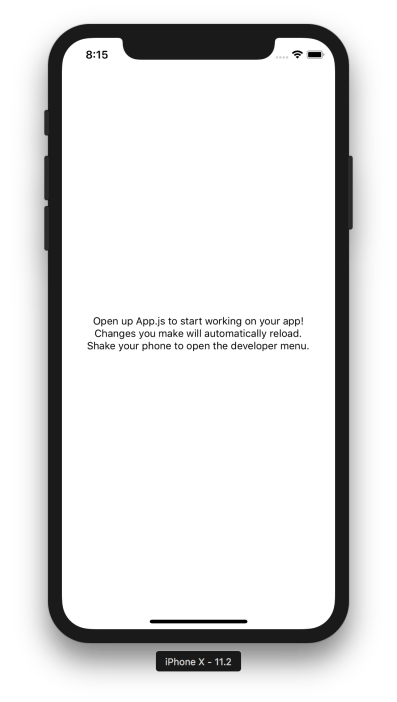
The App.js file is what contains the actual content of your app:
import React from 'react';
import { StyleSheet, Text, View } from 'react-native';

export default class App extends React.Component {
  render() {
    return (
      <View style={styles.container}>
        <Text>Open up App.js to start working on your app!</Text>
        <Text>Changes you make will automatically reload.</Text>
        <Text>Shake your phone to open the developer menu.</Text>
      </View>
    );
  }
}

const styles = StyleSheet.create({
  container: {
    flex: 1,
    backgroundColor: 'white',
    alignItems: 'center',
    justifyContent: 'center',
  },
});
The import statements at the top make the file aware that we are using React and React Native. Next, we define the App class inside which, we have the render function. This is what tells the browser/device what will be displayed on the screen. Here, we simply return three Text components wrapped with a View component. Towards the bottom, we define a stylesheet. More on these in a bit. If we make any changes to this file, the app (or the simulator) will reload with those changes reflected. This is the best part about developing with React Native. No more compiling after every minor change and waiting for the app to reboot. This saves a substantial amount of time when working on an app and encourages the playfulness that developers tend to have to tinker with their app.
Let’s talk Components now. Components are the building blocks of any UI. Anything can be considered a component: a button, a text box or even an entire application. App.js, the file which currently contains your entire application, is also a React component. The React Native library provides some core components to build your app. The two primary ones are <View> and <Text>. Views are the most basic building block of React Native apps. These are primarily used for styling and layout of its children elements. <Text>, as the name suggests, is used to render text. These are the components that get transformed into the native elements of the platform the app is running on. Below are what the View and Text components are interpreted as by the target platform.
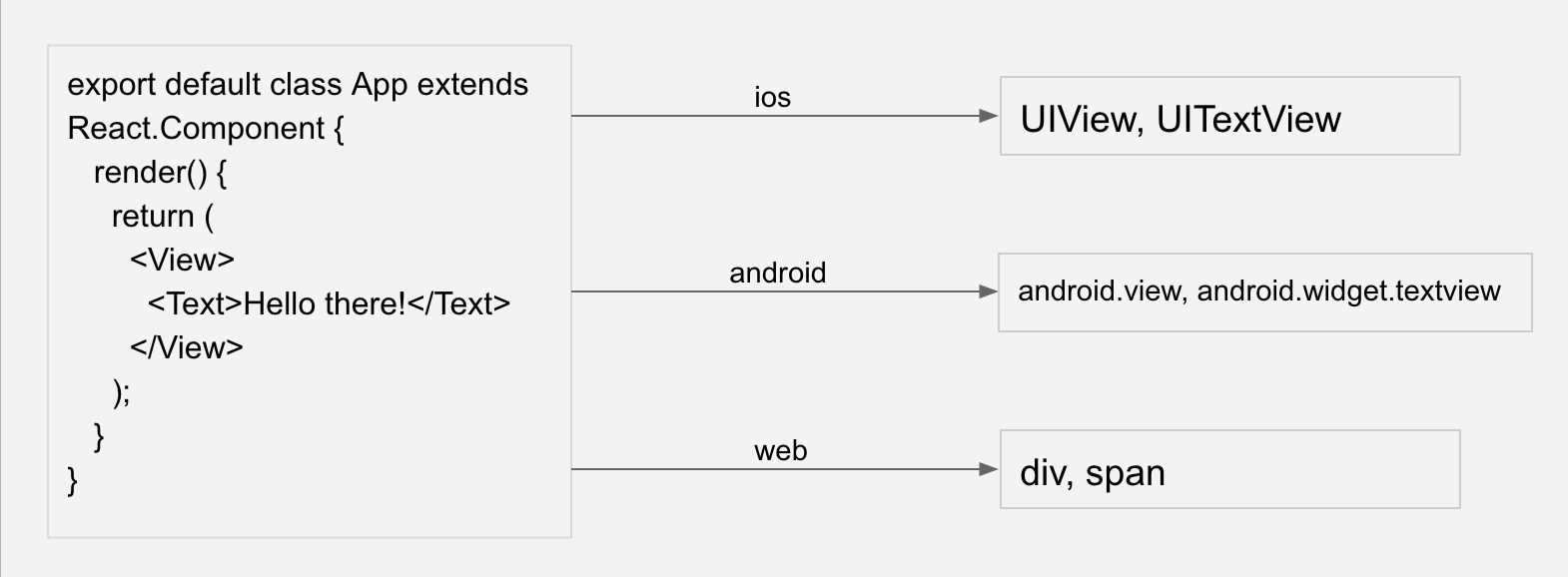
Other components include ones for lists, images, inputs, touchable areas, animations, etc. React Native also has platform specific components (like TabBarIOS and NavigatorIOS) which gives the application a truly native user experience. There are also many incredible component libraries out there to make sure you’re never reinventing the wheel.
The styling of a component is done using the Stylesheet. In the stylesheet, a component can specify the layout of its children using the flexbox algorithm. Flexbox is designed to provide a consistent layout on different screen sizes. For me, this was the most tricky part, since I don’t have any experience with Flexbox. But once you get the hang of it, it becomes quite powerful in specifying how the different components of an app should look. Here are some examples of flexbox in action:

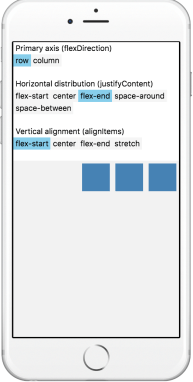
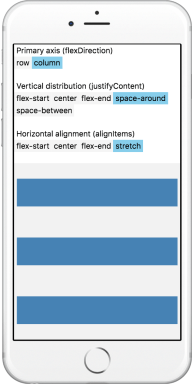
To get a better taste of it, I recommend using the App we created above, or going to the React Native official site or to React Native Express to play with the values of the different flexbox controls.
Most applications have to deal with data, whether it is data the user just entered (ex: text inputs) or data a user entered a long time ago (ex: settings). And data needs to be managed. In this area, React Native can use the same techniques React uses. The best choices would depend on the complexity of the app itself. The simplest way is to store data in the state of a component and update it every time a user performs a relevant action on the component. A more complex way of dealing with data is to use Redux (most popular), GraphQL (to retrieve data from a server) or Realm (best for large amounts of data). Data persistence is often crucial to a great mobile experience. For example, you don’t want the user to log into your app every time they open it. A quick way to achieve data persistence is the built-in AsyncStorage API which makes it easy to save and retrieve key-value pairs. Libraries such as Redux Persist and Realm also provide persistence automatically when the user loads the app. If you would like to get data from a server, since React Native at its core is simply JavaScript, it’s common to use the fetch API directly. The idea is that React Native allows you to have the developer experience of a React/JS developer while giving the user experience of a native mobile application.
To finish off, I want to talk about the React Native CLI. Using this, you can not only integrate React Native into an already existing app, you can also write native code along with React Native in a new app. This is very useful if you know you’ll need custom native modules in your app. This is where the “bridging the gap between JavaScript and Native developers” comes in. If you simply run the following commands:
npm install -g react-native-cli
react-native init AwesomeProject
You will end up with a fresh React Native project with some extra files and folders. The most interesting of these are two folders called ‘ios’ and ‘android’. These are the native side of the app. Inside the ‘ios’ folder is an XCode project of the iOS app, while inside the ‘android’ folder is an Android Studio project. Here you can start writing Native code that can work hand-in-hand with your React code.
That was React Native. I only covered the tip of the iceberg here. React has been out for a few years now and has become the most popular way to build dynamic web applications. Like React, React Native is a well thought out library, that can really help build better products when you understand the right way to apply it. It can help you be cross-platform on mobile, but also cross-platform with the web. For example, the React Native project has a sibling project for the web which requires only a few extra steps to bring your app to the web. So, if you’re considering a native developer writing a new app, or a web developer wanting to learn mobile development, React Native should be considered as one of your best options.



 Kavi Reads
Leave a comment