
Building a dynamic web application can be a daunting task. As the number of elements increases, keeping track of all of them and how they interact with each other can be tiresome. Every user interaction will result in our code looking for every relevant element and updating them one after the other. Using the ReactJS library can simplify this process significantly. If you’ve been thinking of using React, but don’t really know how to start building applications quickly, here are the basic steps you need to follow:
- Break the application into components
- Build a static version of the application
- Determine what data needs to be stateful and where it should live
- Hard-code the initial state
- Add the child-to-parent data flow
- Add server communication to get the real data
The core idea behind React is dividing the application into smaller, easy to manage components. Components can be basic elements like buttons, text boxes, or more complicated ones like headers, toolbars, even full web pages. Each component has two data objects: state and props. The state is the internal data each component keeps track of, while props are data passed to it by a parent component. This is the first step in building a React application: break the app into components. Let’s take the Twitter home page as an example. Twitter will have a few basic components: Tweets list, Profile card, Trends, Header, etc.
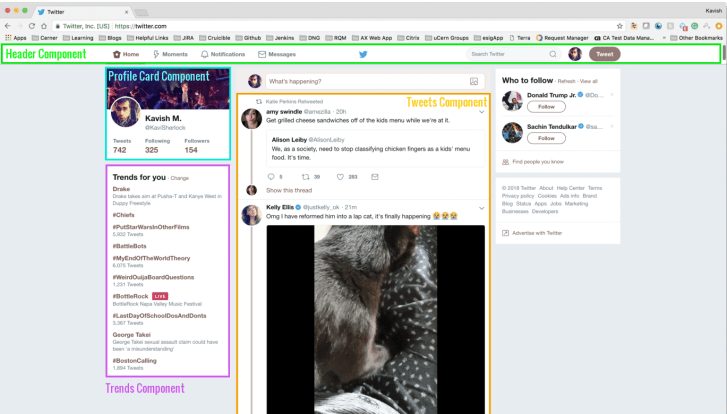
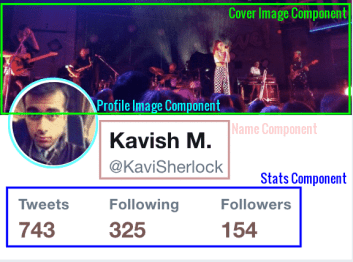
Each of these can also be broken up into components; the Profile card has the profile image, cover image, name, stats.
After that, next goal should be to build a static version of the app, with some empty components. This step allows us to focus solely on our user interface without worrying about the data.
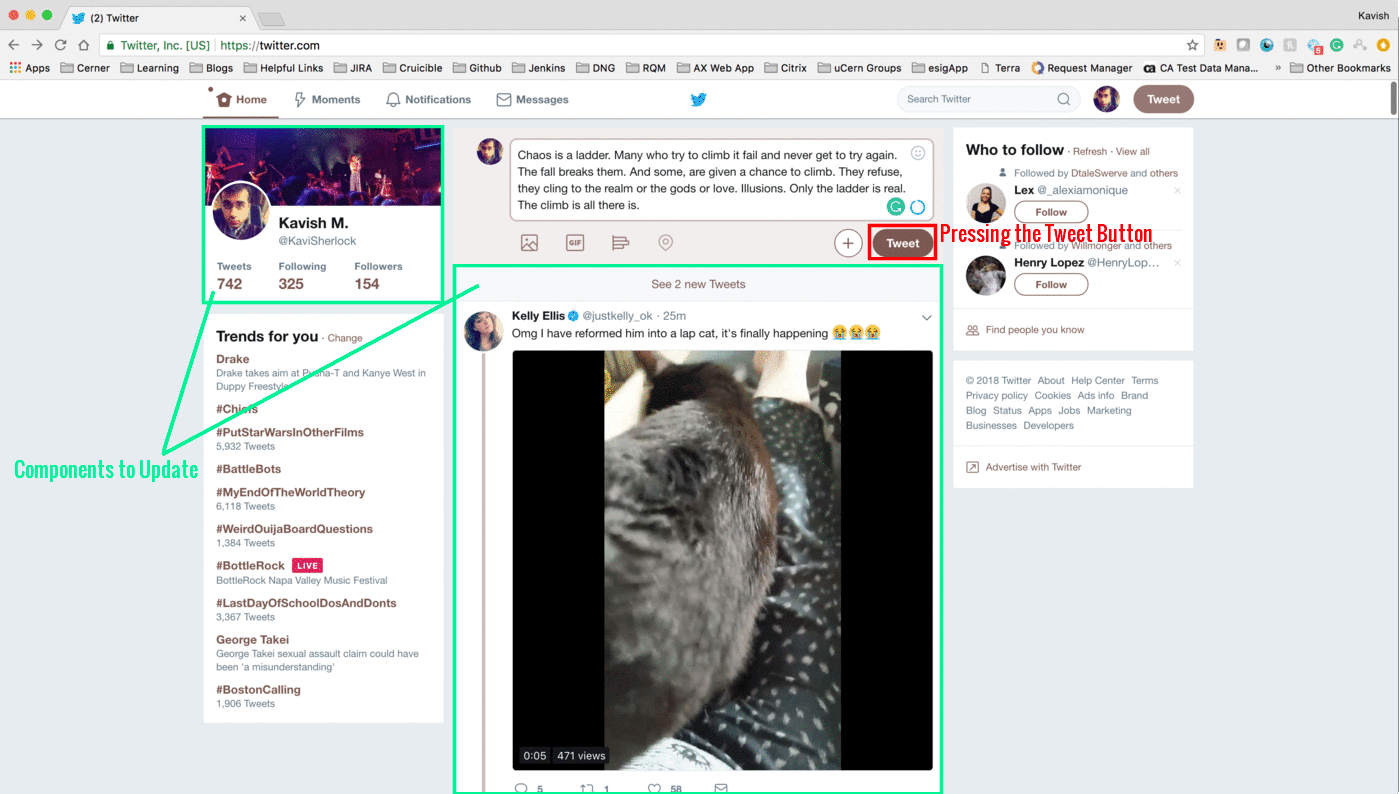
Once we are happy with the layout, we need to decide what data belongs to the state and which components should carry that state. In case of Twitter, stateful data can be the currently logged in user, the user’s feed, currently trending topics, etc. Our aim should be to build as many stateless, pure UI components as possible to encourage reusability and simplicity. The ideal way is to have your application state live in one place, whether that be in the top-level component, or Redux (more on that later), and pass it to the children as props. After deciding where the state lives, the best way to test our application at this stage is to hard-code some state values, to truly see what the application looks like with data in it. Parent components talk to their children components via props. This is a one-way data flow. However, in many cases, children need to talk back to the parents. For example, if a user types a new Tweet and presses the “Tweet” button, the button needs to let the app know a new Tweet has been posted. This is our next step: adding the inverse data flow and add event handlers on the leaf components that chain up the hierarchy. Pressing the Tweet button not only updates the Tweets list, but also the Stats on the Profile Card. Moreover, the application would need to send the Tweet to the server to store it in the Twitter database.
Which bring us to the final step. Once all that is done, we are ready to talk to a server and get real data to populate our application. And that’s it. Now you have a live working application using the ReactJS library.
While React makes managing UI elements easy, as your application grows, managing data can be cumbersome. A simple user interaction can result in changes in many discrete parts of your application. Elements can get out of sync. We saw this above where posting a new Tweet needs to update both the Tweets list and the stats in the Profiles card, while also making a service call saving the new Tweet to the Twitter database. This is where the Redux library comes in. The idea behind Redux is simple; as I hinted about, it stores the entire application’s state in one place: the Redux store. Each user/server interaction that needs to update the state dispatches an action. This action is caught by a handler known as the reducer. The reducer checks the action type and makes the appropriate updates to the state. The state is immutable outside the store, and the reducers are the only ones that can update the store.
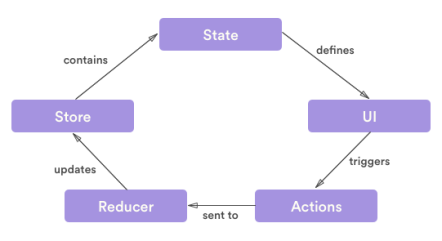
Components can subscribe to the state so that the components can be re-rendered with any updates in the relevant state items. A major advantage of Redux is that each component can subscribe to the parts of the state they need. No data needs to be passed down from the top-level app component to all the leaf components. This makes it almost trivial to keep discrete parts of the application in sync. In the example above, all we would have to do is subscribe the stats component and the Tweet list component to the “Tweets” part of the state. Any update on the Tweets will immediately notify both the components. And, just like we broke the application UI into individual components, with reducer composition we can break down the state-update logic into smaller functions with each managing a different part of the state. This makes development and testing easy, and will get you building applications faster and better.



 Kavi Reads
Leave a comment